
Some of the links on this page are affiliate links, which means I may earn a small commission if you make a purchase through them, at no extra cost to you. This helps support the site and allows me to continue creating helpful content.
Home backup power systems have become really important in 2026. Severe weather, aging grids, and more people working from home mean that reliable electricity is just about essential. I know from experience how disruptive even a short blackout can be. From spoiled food in the fridge to missed meetings or important medical equipment going offline, blackouts take a real toll. If you want to make sure your lights, devices, and appliances stay on during an outage, building your own backup power system is one of the smartest projects you can take on. Here, I’m sharing my step-by-step guide based on practical experience, product research, and plenty of real-life testing.
Compare solar generator systems and current prices
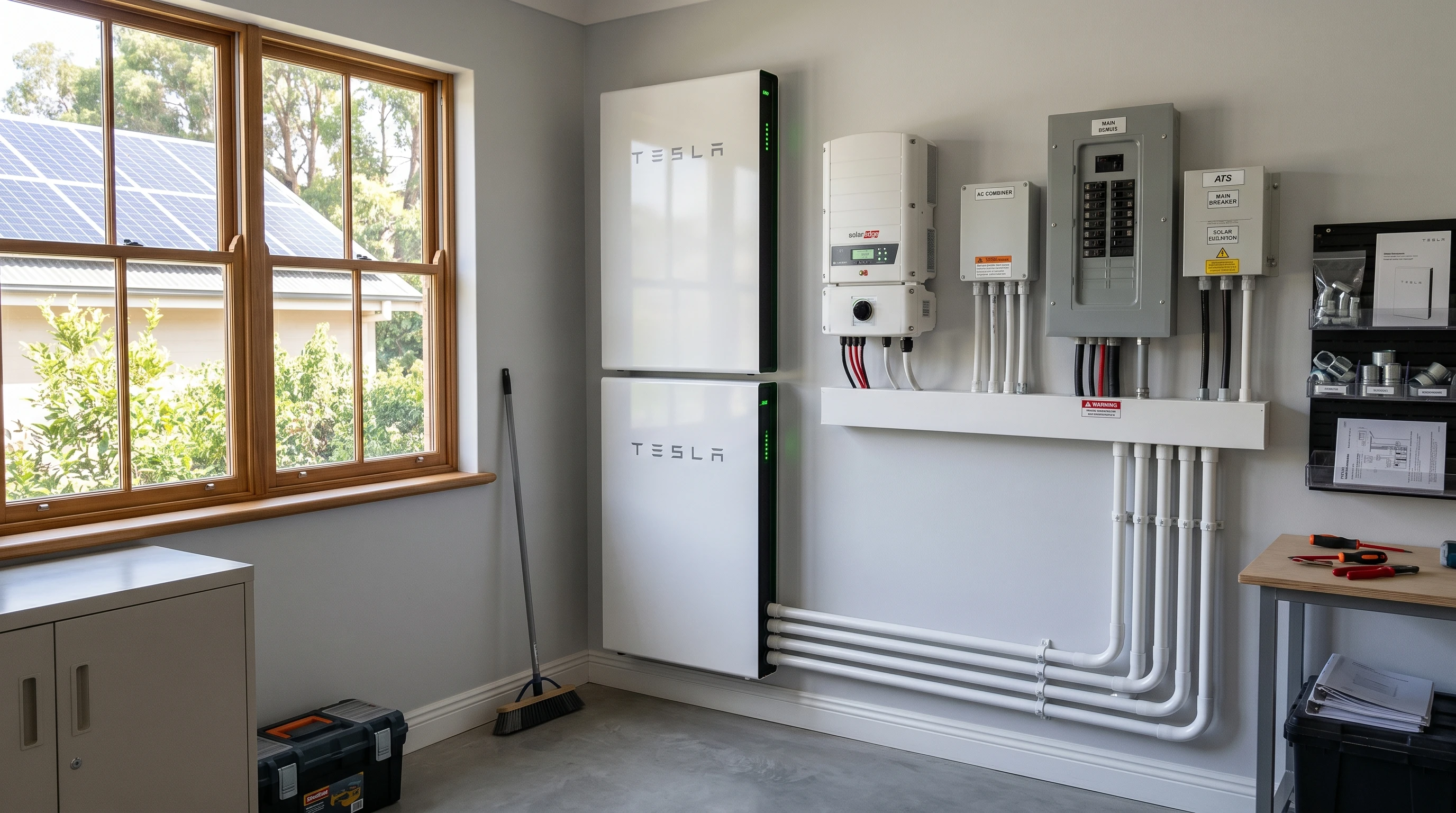
Understanding What a Home Backup Power System Does
A home backup power system is a setup that provides electricity during blackouts or utility grid failures. Most systems combine batteries, inverters, solar panels, and sometimes generators to supply enough power for essential needs. Choosing the best system for your home helps you keep everything running, from the refrigerator to your WiFi. As more people invest in home energy solutions, the market for backup systems keeps growing, making solutions more affordable and user-friendly.
Home backup power used to be mainly for off-grid cabins and rural locations. That has changed quickly. With more practical, high capacity batteries and plug and play devices, it’s a project almost anyone can tackle. The real benefit is peace of mind, knowing you’ll stay comfortable and connected even when the grid goes down.
Step 1: Figure Out What You Need to Keep Running
My first step, and the one I always recommend, is deciding which devices or appliances are absolutely necessary in an outage. Not everything has to stay on, so you can design your system around the essentials. A list can include:
- Refrigerator and freezer
- WiFi router and modem
- Charging for phones and laptops
- Lighting (LED bulbs use very little power)
- Garage door opener
- Medical equipment (like CPAP machines)
- Sump pump or water pump (if you have one)
- Small appliances (like a coffee maker or microwave)
I always write down the specific devices and avoid guessing. This way, it’s easier to size the system correctly without spending too much or ending up short on power.
Step 2: Calculate How Much Power You’ll Actually Need
Every device has a label showing how many watts it pulls. Add up the watt usage for everything on your must-have list. Watts are the measure of how much energy something uses at any moment. For example, my fridge uses about 200 watts, while an LED lamp only uses around 10 watts. A WiFi router might use about 15 watts.
I like to look at both starting watts (the burst needed to turn things on) and running watts (the amount needed to keep something powered). For fridges and pumps, starting watts can be much higher than running watts. Here’s a practical way I break it down:
- Fridge: 200W (can reach 600W when the compressor starts up)
- Router: 15W
- Laptop: 60W
- LED lights: 30W total (for three lights)
- Phone chargers: 10W
Add everything up, and you’ll have a pretty good idea of your system’s minimum power capacity. Most people find their core devices need between 300 and 1,400 total running watts. I like to add a small buffer in case I need to use something else during an outage.
Learn more in my guide: Solar Generator vs Gas Generator
Step 3: Decide Which Type of Backup System Works for You
Backup systems can be simple or advanced. The most common options in 2026 are:
- Portable Power Stations (solar generator kits). Rechargeable batteries with builtin inverters, sometimes with solar panels. Safe for use indoors. Perfect for renters or apartments.
- Stationary Battery Systems. Larger, wall mounted or floor mounted battery solutions that connect to your home electrical panel. Works best for homeowners. Tesla Powerwall and similar options fall into this category.
- Gasoline, Propane, or Dual Fuel Generators. Powerful, but noisy and must be used outdoors. These are common for people who want extended backup or who live somewhere with frequent long outages.
- Hybrid Solar + Gas Systems. Combines solar power and generators for maximum reliability. Solar keeps your system charged, while a generator can kick in when the sun isn’t enough.
Because I work from home and care about safety, I use a solarbased system for most needs. Gas generator backup is helpful if you need to power really big appliances or want extra redundancy.
Explore solar generator options for home backup
Step 4: Get the Right Size Battery and Inverter
The battery and inverter are the heart of your backup system. The battery holds stored energy, and the inverter turns that stored energy (DC) into the kind of power your home uses (AC). The key number to check is watt hours (Wh) or kilowatt hours (kWh) for batteries, and wattage for the inverter.
- Small setups (for lights, phone, and router): 500–1,000 Wh battery; 300–500W inverter
- Medium setups (add fridge, more lighting, laptop): 1,500–3,000 Wh battery; 1,000–2,000W inverter
- Fullhome backup (runs almost everything except heavy AC/heating): 5,000–15,000 Wh battery; 3,000W or bigger inverter
I prefer building in a 20% “just in case” margin. If my calculated need is 1,000 Wh per day, I aim for 1,200 Wh or more. This helps for longer outages or unexpected extra device use.
See solar generator sizes and recommended models
Step 5: Add Solar Panels for Extra Energy (Optional, but Smart)
Solar panels help recharge your batteries when the power is out for a long time. I recommend portable or roof-mounted solar panels for almost everyone, unless you live somewhere with very little sun. The more wattage your panels can generate, the faster your backup system gets recharged.
For example, 400 watts of solar panels can charge a 2,000 Wh battery fully in about five or six good sun hours. If you want longer runtime and true independence, solar is almost always worth including. I look for kits that include folding or portable panels for easy setup and storage.
Check solar panel kits compatible with home backup systems
Step 6: Think About How Long You Want Backup Power to Last
How often you lose power and how long it usually takes to return are both really important. If outages last just a few hours, a smaller system works fine. For areas with weatherrelated outages that can last days, I recommend sizing up the battery or including both solar and generator charging. Here’s how I decide:
- If power is out less than four hours: Small system, quick recharge
- For outages that last 4–24 hours: Medium system or solar/gas hybrid
- For outages longer than 1 day: Big battery, solar, plus backup generator (if possible)
I also look at past outage history in my area and check with neighbors or local utility reports to make an educated guess about what size makes sense.
Step 7: Buy, Install, and Test Your System. Safely
After picking your equipment, it’s time to set everything up. For plug and play portable stations, setup can be as easy as charging the battery, plugging in your essential devices, and connecting solar panels outside. Stationary battery systems might need installation by a qualified electrician, especially if you want them connected to your home’s electrical panel. This makes sure the system works safely with your wiring and any transfer switches.
I always test my system by simulating an outage. I unplug my main power and run all essentials from the backup. This gives me confidence and helps spot issues before I need it for real.
Regularly charging batteries and checking connections keeps everything working. Some systems include WiFi or Bluetooth apps to help monitor charging and battery levels from your phone.
Real-Life Backup Power System Examples
Apartment Solutions
For renters or urban apartments, a portable solar generator is usually the best fit. I’ve used a 1,000Wh power station with a 200W solar panel, run it from a sunny window or balcony, and kept my phone, modem, and a lamp running through several outages with no issue. These are safe indoors since they don’t produce fumes.
See compact solar generators for apartments
Small Family Homes
If you have a house and a few more devices to power, a midsized solar generator or a home battery setup works well. Running a fridge, lights, and WiFi during blackouts is a lifesaver for families. I recommend finding a system designed to run at least 2,000 Wh, with expansion batteries if your budget allows. Add solar panels so you aren’t left recharging from the grid every time.
Browse mid-size home backup systems
Full Scale Backup (Larger Homes, Rural Areas)
Bigger homes or those with well pumps, sump pumps, or people with medical needs benefit most from a hybrid setup. I help friends design systems that include a few solar batteries, roof or groundmount solar panels, and a gas generator loaded with propane or gasoline. This covers you through storms, heatwaves, or longer grid failures.
Explore high-capacity backup systems
Common Problems and Easy Fixes
- Sizing Too Small: I see a lot of people underestimate how much power even “just the basics” use. My advice is to measure or meter the actual usage of each appliance using a plugin meter to avoid guesswork.
- Stretching Battery Too Far: Don’t run your batteries all the way to zero often. Batteries last longer when kept above 20–30% capacity.
- Not Charging Regularly: I set calendar reminders to top up my backup battery every month and after any use, so it’s ready.
- No Manual Transfer Switch: For stationary units wired into the home grid, always use a transfer switch installed by a professional. This prevents dangerous situations for lineworkers and equipment damage.
- Ignoring Maintenance: Gas generators, in particular, should be run every month or two and checked for stale fuel, oil, and filter changes.
- Overlooking Solar Placement: Solar panels need to be angled toward the sun and not shaded. I learned this the hard way with some unexpected shade from a neighbor’s tree.
Extra Tips for Better Performance and Peace of Mind
Once your backup power system is running, a few extra steps will make a big difference:
- Upgrade to energyefficient appliances. Modern fridges and LED bulbs draw a lot less power, stretching what your backup battery can do.
- Label your essential plugs and outlets for quick changing during an outage. Having them organized saves precious minutes in the dark or during emergencies.
- Make a backup lighting kit (with headlamps, lanterns, or LED bulbs) and store it where you can find it easily. This makes sure you’re never left searching for light.
- Store extra extension cords and USB charging cables near your power station. Preparedness is key, especially if you need to reach devices in another room.
- Use a test load (like a hair dryer or a small heater) to make sure your system can handle surge loads before real emergencies hit. This gives you peace of mind and avoids surprises.
- Contact your local utility company and check for outage notification services, so you’ll have an early warning and can prepare your system in time.
What Equipment Do I Recommend for 2026?
The best backup power systems for home use usually include the following:
- Portable lithium iron phosphate (LiFePO4) battery station for safety, long life, and fast charging. These batteries are safer and last longer compared to older technologies, making them a solid choice for most backup projects.
- High efficiency solar panels (foldable or fixed, at least 200W for basic needs). Folding designs are especially handy for quick setups or moving between locations.
- Pure sine wave inverter for running sensitive electronics safely. Pure sine inverters prevent possible damage and make sure your tech operates smoothly.
- Safe, grounded extension cords of different lengths. Having a variety on hand lets you run power where it’s needed most.
- Transfer switch (for hardwired, wholepanel backup) installed by a qualified electrician. This helps protect both your family and the power workers when the grid comes back.
- Fuel stabilized dualfuel generator (for larger or rural homes; optional). These combine the flexibility of gasoline and propane, giving you run time and flexibility during lengthy power cuts.
Brands like EcoFlow, Bluetti, and Jackery keep leading the portable solar station market, while companies such as Tesla, Enphase, and LG have great stationary battery system options. Always check for current prices, warranties, and safety certifications. It’s also smart to look into what kind of monitoring tech comes with your chosen system, such as built-in apps or display screens, to keep tabs on power usage and battery health.
Check current models and pricing
Frequently Asked Questions
How do I install a home backup power system myself?
Most portable backup systems are plug and play. For wholehome solutions, you’ll probably need a licensed electrician to wire the battery and transfer switch into your panel. Always follow the manufacturer’s safety instructions and never cut corners. If you’re not sure, it’s worth asking a pro for advice.
What’s the difference between a solar generator and a gas generator?
Solar generators are battery powered and recharged by sunlight, with no fumes or noise. Gas generators use fuel and produce more noise and exhaust, but run as long as you have fuel available. Many people combine both for extra coverage if they live in areas with lots of cloudy days or long outages.
Can I add more batteries or solar panels later?
Yes, many top brands design their systems to be expandable. I chose a setup where I could add battery packs and plug in up to 800W of solar panels. Always check compatibility before buying extra components to prevent disappointment and wasted money.
Is it possible to run my whole house on backup power?
If you have enough batteries and a strong inverter, you can back up your entire house. Most people focus on “essential circuits” to save on cost and keep things practical. Backing up heavy appliances (like electric ovens or AC units) might require a much bigger investment and more planning.
How do I keep my system working during long outages?
Solar panels help lots with recharging. If you expect frequent long outages, also consider having extra batteries and a backup generator for cloudy or rainy days. Keep fuel fresh, batteries maintained, and test all components regularly, so you aren’t surprised during a real emergency.
Wrapping Up
Building your home backup power system gives you comfort, security, and more independence from the grid. The process is pretty simple when you break it down into steps: list essentials, calculate loads, choose a good system, decide if you want solar, and make sure you can recharge for as long as you need. Testing and maintaining your setup helps everything work when it matters most.
Start with a system that fits your most important needs, then upgrade as your budget and experience grow. Whether you go with a powerful solar station, a classic generator, or a cutting edge wholehome solution, being prepared means fewer worries when the lights go out and more control over your home’s comfort and safety in challenging times.
Compare the best home backup power systems and build the right setup for your needs