
Power outages can happen without warning, and the first few minutes can feel confusing. Besides finding light and checking essential devices, it is also important to think about which appliances and electronics should be unplugged.
The main concern is not always the outage itself, but what happens when electricity returns. Power can sometimes come back with a surge or unstable voltage, which may damage sensitive electronics, smart appliances, chargers, and devices with circuit boards.
This guide explains what to unplug during a power outage, what should usually stay plugged in, how to protect refrigerators and freezers, and what to check before reconnecting devices when power comes back.
Quick Answer: What Should You Unplug During a Power Outage?
During a power outage, unplug sensitive electronics and nonessential appliances first. This may include computers, TVs, monitors, gaming consoles, chargers, microwaves, coffee makers, air fryers, washing machines, dryers and dishwashers. Routers and modems may be worth keeping available if they are connected to a suitable UPS or backup power source and your internet service remains operational.
Keep one light switched on so you know when power returns. Refrigerators, freezers, essential medical equipment, sump pumps, and safety devices should usually stay plugged in unless there is damage, flooding, burning smells, or official advice to disconnect them.
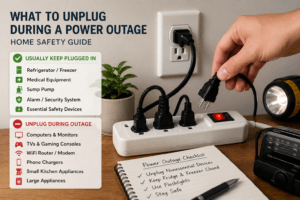
| Item | Should You Unplug It? | Why It Matters |
|---|---|---|
| Computer/Desktop | Yes | Protects from surge and data loss |
| TV/Monitor | Yes | Prevents surge damage |
| Game Console | Yes | Protects delicate components |
| WiFi Router/Modem | Depends |
May be useful with suitable backup power; otherwise unplugging can reduce surge exposure |
| Phone Chargers | Yes | Protect chargers and connected devices |
| Microwave/Coffee Maker | Yes | Protects electronics from surge |
| Refrigerator/Freezer | Usually leave plugged in* | Keeps food cold; unplug only if there’s damage |
| Medical Equipment | Usually keep powered* | Essential for health/life; follow manufacturer advice |
| Lamps/Light | One stays on | Tells when power returns |
*Unplug only if advised, if there’s damage or safety risk. Read the manual or ask a qualified professional for essential items.
Why Unplugging Matters During a Power Outage
Unplugging is about more than saving energy. Electrical service can sometimes be unstable when power is interrupted or restored, and voltage spikes or fluctuations may affect sensitive equipment. Electronics and appliances containing power supplies, smart controls or circuit boards can be particularly vulnerable. Disconnecting nonessential sensitive devices during an outage can reduce their exposure to these electrical disturbances until power has stabilized.
Electronics You Should Unplug
Sensitive electronics are usually the first items to disconnect during a blackout. These may include:
- Desktop computers and laptops that are charging
- Monitors and large screens
- TVs and entertainment systems
- Gaming consoles
- Tablets and phone chargers
- Smart speakers and home assistants
- Printers, scanners, and home office equipment
Many of these devices contain circuit boards, power supplies, or sensitive components that may be affected by voltage spikes when electricity returns. Even if a device is switched off, unplugging it from the wall gives it an extra layer of protection during an outage.
Kitchen Appliances to Consider
Kitchen counters are often lined with small appliances that have digital controls or touch panels. Consider unplugging items such as:
- Microwaves
- Coffee makers (especially programmable ones)
- Toaster ovens and air fryers
- Blenders and food processors
- Instant Pots or other smart cooking devices
Unplugging these nonessential appliances during an outage can reduce their exposure to voltage spikes or fluctuations when electrical service is restored. For refrigerators and freezers, the rules are a bit different; most experts recommend leaving them plugged in, except in cases of visible damage, burning smells, or if your power utility tells you otherwise. If you have specialty appliances like wine coolers or ice makers, unplug them too if they’re not mission-critical.
Should You Unplug the Refrigerator or Freezer?
In most situations, refrigerators and freezers are left plugged in during a power outage. This helps them start cooling again as soon as electricity returns. To protect food, keep the doors closed as much as possible and avoid checking inside repeatedly.
However, unplug the appliance or avoid using it if there are warning signs such as:
- Burning smells, smoke, or sparks
- Flooding near the appliance or wall outlet
- Visible wire, plug, or outlet damage
- Signs of electrical arcing
- Official advice from the utility company or emergency services
If there are no warning signs and power returns normally, the refrigerator or freezer can usually remain plugged in. If the appliance was unplugged, follow the manufacturer’s guidance before reconnecting it. If there is water damage, burning smells, repeated breaker trips, or visible electrical damage, contact a qualified professional.
Large Appliances and Heating or Cooling Systems
Major appliances draw a lot of power when starting up. During a blackout, switching off or unplugging nonessential large appliances can reduce the number of heavy loads that restart when power returns. Some appliances to switch off or unplug include:
- Dishwashers
- Washing machines and dryers
- Electric ovens
- Portable air conditioners or space heaters
- Electric water heaters
Keeping these appliances switched off initially can help avoid multiple high-power loads restarting at the same time. Once electrical service appears stable, they can be brought back into use gradually. Central air handling units or furnace controls usually have their own breakers. Only flip breakers yourself if you know what you’re doing and it’s safe; otherwise, wait for power to come back on and consult a professional if you notice any issues. When in doubt, stagger plugging items back in so your power system isn’t instantly overloaded.
What Should Stay Plugged In?
Not everything should be unplugged during a blackout. Some devices play a vital role in health, safety, or property protection. Before unplugging anything, check whether the device is essential for health, safety, or property protection.
- Essential medical equipment (oxygen machines, CPAPs, ventilators, powered beds)
- Refrigerator and freezer units (as mentioned above, unless damaged or advised by authorities)
- Home sump pumps (for basement flood prevention)
- Alarm systems or basic security devices needed for safety
- Backup battery or emergency power supply (if wired safely and as per manufacturer’s guidance)
If anyone in the home relies on critical medical equipment, follow the manufacturer’s instructions, medical advice, and any emergency backup plan provided by the device supplier or healthcare professional. Do not assume that a general-purpose UPS, portable power station or generator is suitable for a medical device unless compatibility has been confirmed. Never try to supply power to these devices using DIY methods or unsafe “backfeeds”; ask a professional or your device supplier for emergency advice.
Power Strips, Surge Protectors and UPS Devices
Not all power strips are equal. A basic power strip just splits one outlet into several without adding protection. Surge protectors are designed to help absorb a sudden spike, though they can only handle so much energy before wearing out over time. Surge protectors are commonly used for TVs, entertainment systems, computers, and other sensitive electronics. For home office equipment or essential devices that must stay on briefly, a UPS can provide temporary battery power long enough to safely shut down equipment or ride out a short outage. For medical devices, always follow manufacturer and healthcare guidance before relying on a UPS.
Check surge protectors according to the manufacturer’s guidance and pay attention to any protection-status indicator provided on the unit. Surge protection components can degrade after significant surge events, so replace the device if its protection indicator shows a fault or if the manufacturer recommends replacement. Some smart surge protectors also include monitoring features, usage tracking, or remote power control, but they should still be used according to manufacturer guidance.
What to Do When Power Comes Back On
After electricity returns, it is usually wise to wait a few minutes before reconnecting nonessential devices.
Listen for any unusual buzzing sounds and check for burning smells near outlets, cords, and appliances. Before plugging devices back in, look for:
- Smoke, sparks, or popping sounds
- Burning smells near outlets or appliances
- Flickering lights that do not settle quickly
- Tripped breakers or blown fuses
- Water damage near cords, plugs, or electrical equipment
- Appliances or outlets that look damaged
If sparks, popping sounds, burning smells, visible damage, or water near electrical equipment appear, do not touch outlets, switches, plugs, or cords. Contact a qualified electrician or emergency service if there is an immediate safety risk.
If everything looks and smells normal, start reconnecting devices gradually. Begin with essential items first, then move on to nonessential electronics and appliances. Plugging everything back in at once can put extra strain on the home’s electrical system, while a slower step-by-step approach makes it easier to notice warning signs before they become serious.
Common Mistakes to Avoid
- Leaving all electronics and large appliances plugged in during the outage
- Plugging every device back in at once when power comes back
- Opening fridge or freezer doors too often, letting cold air out
- Overloading extension cords or using too many adapters at once
- Using outdoor-only equipment indoors, especially fuel-powered generators
- Using gas, propane, or diesel generators indoors, in garages, or near open windows
- Ignoring unusual smells, scorched outlets, or repeated breaker trips
- Trying to DIY electrical repairs without the right background or qualifications
Contact a qualified professional for serious electrical problems or whenever there are signs of damaged wiring, outlets or electrical equipment. Even if an outage seems routine, careful checks can help reduce the risk of damage, injury, or unsafe electrical problems.
Backup Power Options to Consider
Backup power can make outages easier to manage, but the right option depends on what you need to run, how long you need power, and whether the equipment is safe for indoor or outdoor use.
A UPS can help protect computers, routers, and home office equipment during short outages. A portable power station may run small electronics or selected low-power appliances, depending on its capacity and the device load. Solar generators can recharge from solar panels, but charging speed depends on daylight, weather, panel size, and system design. Home battery systems and standby backup systems can provide more coverage, but they usually require professional planning and installation.
Fuel-powered generators should never be used indoors, in garages, near open windows, or in enclosed spaces because of carbon monoxide risk. For medical equipment, essential safety devices, or critical appliances, follow manufacturer guidance and speak with a qualified professional before relying on any backup power setup.
Plan Your Essential Backup Power Before an Outage
Knowing what to unplug is only part of outage preparation. It also helps to identify which devices you want to keep running and estimate how much energy they may need.
The Ecowised Home Power Outage Planner & Runtime Toolkit includes a printable planning guide and Excel runtime calculator to help you list essential devices, estimate energy needs, and compare your available battery capacity with 24, 48 and 72-hour outage scenarios.
Get the Home Power Outage Planner & Runtime Toolkit — £8.99
Related Guides
- How to Recharge a Solar Generator During a Power Outage
- Portable Power Station vs UPS
- Portable Power Station Safety Guide
- Portable Power Station vs Home Battery Backup
- Solar Panels vs Solar Generators
- Best Solar Generators for Home Backup
- Best Home Battery Storage Systems for Residential Use
- How to Prepare Your Home for a Power Outage
Frequently Asked Questions
Should you unplug appliances during a power outage?
Yes, it is usually wise to unplug sensitive electronics, small appliances, and nonessential large appliances during a power outage. Refrigerators, freezers, essential medical equipment, sump pumps, and safety devices should usually stay plugged in unless there is damage, flooding, burning smells, or official advice to disconnect them.
What should you unplug first when the power goes out?
Start with sensitive nonessential electronics such as computers, TVs, monitors, gaming consoles, smart speakers, chargers, microwaves, coffee makers, and other appliances with digital controls. Nonessential washers, dryers, dishwashers, and space heaters can also be switched off or unplugged. Routers and modems may be kept available if they are connected to suitable backup power and the internet service remains operational.
Should you unplug your refrigerator during a power outage?
In most cases, refrigerators and freezers should stay plugged in so they can resume cooling when electricity returns. Unplug them only if there are warning signs such as burning smells, sparks, flooding, damaged outlets, or official advice from the utility company or emergency services.
Can a power surge happen when electricity comes back on?
Yes, a power surge or voltage fluctuation can happen when electricity returns after an outage. This is one reason sensitive electronics and smart appliances are often unplugged during a blackout.
Is it safe to use a surge protector during a power outage?
A surge protector can help protect connected equipment from some voltage spikes, but it cannot protect against every electrical event. Follow the surge protector manufacturer’s instructions, and disconnect sensitive nonessential equipment if there are signs of electrical damage or authorities advise doing so.
What should you do when the power comes back on?
Wait a few minutes before reconnecting nonessential devices. Check for burning smells, sparks, unusual sounds, flickering lights, tripped breakers, water damage, or damaged outlets. If everything appears normal, plug devices back in gradually instead of reconnecting everything at once.
Conclusion
Knowing what to unplug during a power outage can help protect sensitive electronics, reduce the risk of surge damage, and make the situation easier to manage.
Computers, TVs, chargers, small kitchen appliances, and nonessential large appliances are usually good candidates to disconnect until power is stable again. Routers and modems may be worth keeping available when suitable backup power is available and the internet connection remains operational.
Refrigerators, freezers, essential medical equipment, sump pumps, and safety devices should usually be treated differently. These may need to stay plugged in unless there is damage, flooding, burning smells, or official advice to disconnect them.
When electricity returns, wait a few minutes, check for warning signs, and reconnect devices gradually. If there are sparks, smoke, burning smells, water damage, or repeated breaker trips, stop and contact a qualified professional instead of trying to solve the problem yourself.