
Portable power station runtime tells you how long a battery can keep devices running during a power outage, camping trip, or backup power situation. The actual runtime depends on battery capacity, device wattage, inverter efficiency, battery condition, temperature, and how many devices are connected at the same time.
The advertised watt-hour rating is useful, but it is not the same as guaranteed real-world runtime. A power station may lose usable energy through inverter conversion, battery management, cold temperatures, aging, and high-power loads.
Quick Answer
To estimate portable power station runtime, divide the usable watt-hours by the total watts of the devices you want to run. For example, a 500Wh power station running a 50W load may provide around 8 to 9 hours after real-world losses, but the result depends on the model, battery condition, output type, temperature, and connected devices.
For the most realistic estimate, check your device wattages, subtract around 10–20% for real-world losses, and test your setup before relying on it during an outage.
What Portable Power Station Runtime Means
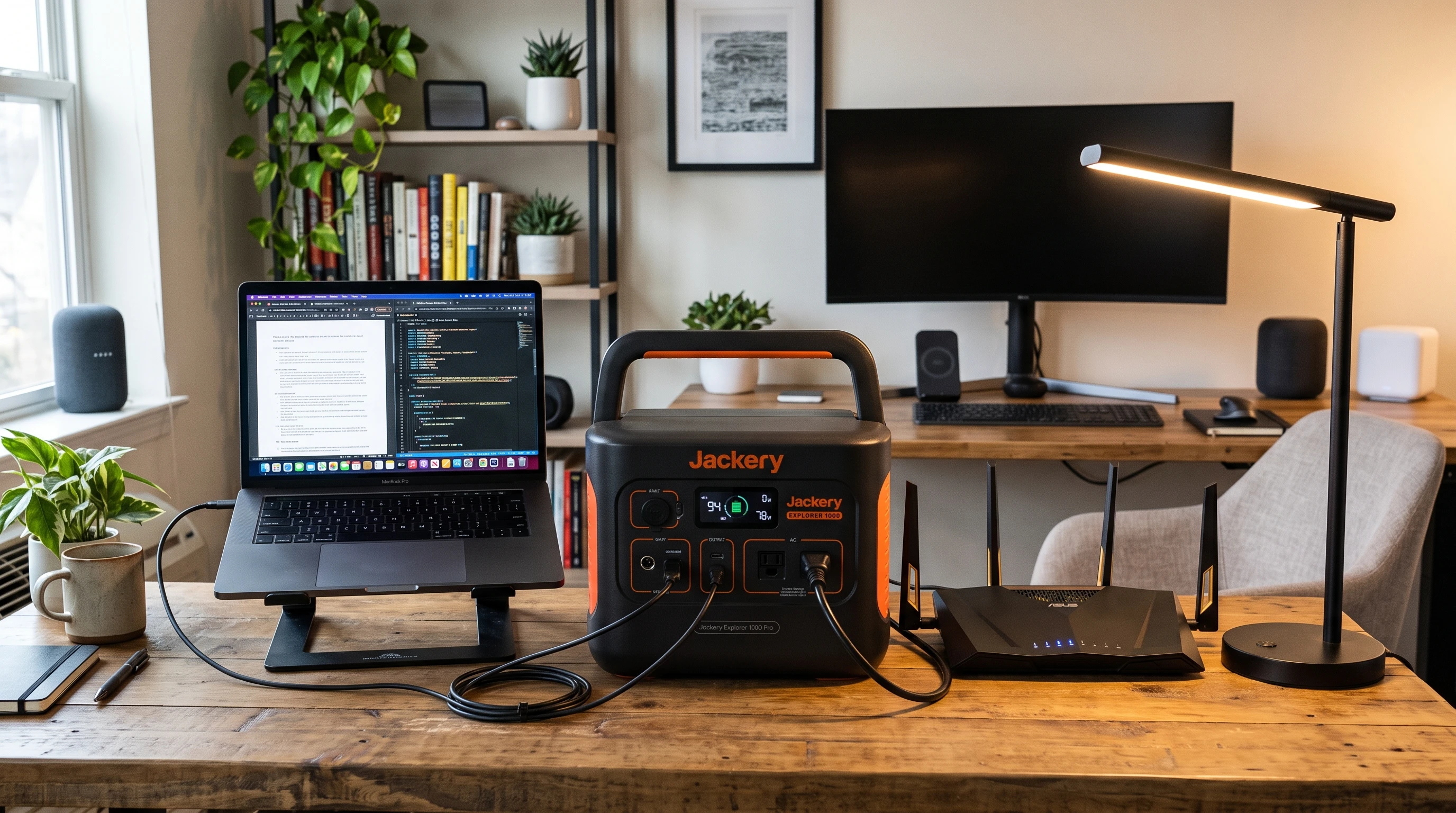
Portable power station runtime means how many hours or minutes the battery can power connected devices before it needs recharging. The more power connected devices draw, the quicker the battery runs down. A single LED lamp may run for many hours, while a laptop, monitor, router, and modem together will drain the battery faster. For example, if a power station is rated for 500Wh and connected devices draw a total of 100W, the theoretical runtime is about 5 hours. In real use, it may be slightly less because of inverter losses and battery management. Several things affect runtime, including:
- Number of devices plugged in
- Total wattage each device draws
- Battery health and age
- Output type (AC or DC)
- Temperature in the room or outdoors
- Built-in safety margins or reserve capacity
Every change in device load affects how long the power lasts. That is why testing your own setup is one of the best ways to prepare before an outage. It can also help to watch for hidden energy drains, such as background processes, standby modes, or devices that continue drawing power when they appear inactive.
Simple Runtime Formula
A simple formula can help estimate runtime:
Usable battery watt-hours ÷ total device watts = estimated runtime in hours
For example, with a 500Wh station running a 40W WiFi setup:
500Wh ÷ 40W = 12.5 hours (theoretical maximum)
But power stations almost never achieve 100% stated capacity during real use. After inverter losses, battery management system, and aging losses (usually between 10-20% total reduction), a more realistic result may be closer to 10 to 11 hours. Losses are usually higher when using AC outlets instead of compatible USB or DC outputs. Understanding these real-world factors helps create more reliable runtime estimates and realistic expectations.
Common Device Wattage Examples
Device wattage can be found on chargers, power bricks, or online manuals. Here’s a quick table with average ranges:
| Device | Typical Wattage Range |
|---|---|
| Router + modem | 10–30W |
| Laptop | 30–65W |
| LED lamp | 5–10W |
| Phone charger | 5–25W |
| Monitor | 15–40W |
| Desktop computer | 100–300W+ |
| Mini fridge/cooler | 30–70W running; might need 200W+ at startup |
| Medical device (CPAP, etc.) | Always follow manufacturer guidance; consult a qualified professional |
For medical devices such as CPAP machines or other essential equipment, do not estimate runtime by guesswork. Check the device manufacturer’s guidance and speak with a qualified professional or healthcare provider about safe backup power options.
Small vs Medium vs Large Runtime
Portable power stations come in different battery capacities. Here’s what typical sizes can handle:
- Small (150–300Wh): Good for charging phones, running a router, or a small laptop for a few hours. Useful for brief outages or short trips, but the runtime is short with anything more than light loads. These units are also more lightweight, making them easy to pack for short trips or as everyday backup in your car.
- Medium (300–700Wh): Useful for a laptop, WiFi equipment, phone charging, and an LED lamp during short to moderate outages. It may support several hours of work, but a full workday depends on the total connected load, battery condition, output type, and real-world losses.
- Large (800Wh+): Better suited to longer outages, multiple devices, or some desktop setups. Runtime still depends heavily on total wattage, so even a large power station can drain quickly if connected to high-power equipment.
No matter which size you pick, remember to factor in the power needs of all the devices you plan to run at the same time, and don’t forget about future energy needs as your setup changes. Compatible solar panels may help during longer outages for recharging extends the usefulness of your backup system during extended outages or while off the grid.
If you are comparing portable power stations, look beyond the advertised watt-hours. Check usable capacity, continuous output, battery chemistry, charging options, UPS or EPS features, and whether the unit can safely handle your essential devices.
Why Real Runtime Is Lower Than Advertised Capacity
Actual runtime is usually lower than the rated advertised watt-hour capacity. The biggest reasons are:
- Inverter Loss: When converting battery (DC) to AC outlet power, some energy is lost, typically between 10-20%.
- Battery Management System (BMS): The BMS prevents the battery from discharging all the way. Many power stations keep a safety reserve, so not every advertised watt-hour is available for use.
- Battery Age: Older batteries hold less charge, so real runtime drops over time.
- Cold Temperatures: Batteries tend to perform worse in the cold, with total available capacity dropping in a chilly room or outside environment.
- High-Power Devices: Using power-hungry devices can drain the battery faster because losses increase under heavy load.
Manufacturers usually publish a rated capacity, but usable capacity is often lower. When planning backup power for essential devices, it is better to factor in these typical reductions. It’s always smart to check manufacturer documentation for efficiency percentages and account for environmental variables, especially in extreme heat or cold.
How to Make a Power Station Last Longer
To extend portable power station runtime during an outage, focus on essential devices and reduce unnecessary power draw:
- Only power essential devices, such as WiFi equipment, LED lamps, phones, and laptops.
- Lower laptop and monitor brightness to reduce energy use.
- Use energy-efficient LED lights instead of incandescent lamps.
- Avoid plugging in printers, space heaters, kettles, coffee makers, or anything that heats up, since these drain batteries quickly.
- Unplug or turn off secondary monitors and any extra tech that isn’t strictly necessary.
- Keep the power station fully charged as the manufacturer recommends, especially before predicted storms or possible outages.
- Do a dry run by testing the planned setup before an outage. This can reveal unexpected power draw, compatibility issues, or shorter-than-expected runtime.
- Store and operate the power station in a temperature range recommended by the manufacturer for best performance.
If solar panels, car chargers, or wall adapters are available and compatible, they may help top up the battery during longer outages or off-grid use. Over time, this approach keeps the station’s battery healthier and extends its overall life span.
Portable Power Station Runtime vs UPS Runtime
Portable power stations and uninterruptible power supplies (UPS) both provide backup power, but they work differently.
- UPS units usually switch to battery quickly during a blackout, giving a computer or network equipment a short window to save work or shut down safely. Most consumer UPS units aren’t designed for extended use and may only run for 10 to 30 minutes at typical loads.
- Portable power stations are built for longer runtimes and can power devices for hours, sometimes all day, depending on the battery size and load. Not all portable power stations switch over instantly like a UPS, though.
If uninterrupted or automatic switchover is important, look for a unit that specifically supports UPS or EPS functionality.
Always check the manufacturer’s specifications for each model’s features. Some power stations only provide backup after devices are manually connected, while many UPS units are designed to switch to battery automatically. Before choosing between a UPS and a portable power station, decide whether instant switchover or longer runtime matters more for your setup.
Related Guides
- What Size Portable Power Station Do You Need for a Home Office?
- Best Backup Power Options for Working From Home During Outages
- How to Keep WiFi Running During a Power Outage
- Portable Power Station vs UPS
- Portable Power Station Safety Guide
- Best Solar Generators for Home Backup
Frequently Asked Questions
How do you calculate portable power station runtime?
To estimate portable power station runtime, divide usable battery watt-hours by the total watts used by connected devices. Then subtract around 10–20% for inverter losses, battery management, temperature, and other real-world factors. A real-life test is the best way to confirm the estimate.
How long will a 300Wh power station run?
A 300Wh power station may run a 30W load for roughly 7 to 8 hours after real-world losses. If the connected devices draw more power, runtime will be shorter. Actual results depend on the power station model, output type, battery condition, temperature, and connected load.
How long will a 500Wh power station run?
A 500Wh power station running a 50W load may provide around 8 to 9 hours after typical real-world losses. Larger loads will reduce runtime, while smaller loads or more efficient outputs may extend it. The best estimate comes from checking device wattage and testing the setup.
Why is real runtime lower than advertised capacity?
Real runtime is usually lower because of inverter loss, battery management systems, reserve capacity, battery age, cold temperatures, and high-power loads. The advertised watt-hour rating is useful for comparison, but it does not guarantee full usable output in every situation.
Does using AC power reduce runtime?
Using AC power usually reduces runtime because the power station must convert DC battery power into AC outlet power. This conversion causes energy loss. Compatible USB or DC outputs may be more efficient for some devices, but users should follow manufacturer guidance and use safe, compatible cables.
Can a portable power station run a router and modem?
Most portable power stations can run a router and modem because these devices usually use relatively little power. A 300Wh unit may keep basic internet equipment running for several hours, but runtime depends on the router, modem, fiber ONT, mesh nodes, battery condition, and output type.
What drains a portable power station fastest?
High-wattage devices drain a portable power station fastest. Kettles, coffee machines, space heaters, hair dryers, large printers, gaming desktops, and large monitors can drain the battery quickly or overload smaller units. Essential low-power devices should be prioritized during outages.
How can I make a portable power station last longer?
To make a portable power station last longer, power only essential devices, dim screens, use LED lighting, avoid high-power appliances, disconnect unnecessary equipment, and use efficient outputs when safe and compatible. Testing the setup before an outage can also help set realistic expectations.
Portable Power Station Runtime: What Matters Most
Portable power station runtime depends on usable battery capacity, total connected wattage, output type, battery age, temperature, and conversion losses. The advertised watt-hour rating is a helpful starting point, but it should not be treated as a guaranteed runtime.
The best way to avoid surprises is to list essential devices, check their wattage, estimate the total load, subtract realistic losses, and test the setup before relying on it during an outage.
A portable power station is most useful when it is sized for essential devices, kept charged according to manufacturer guidance, and used within its continuous output rating. Careful planning can make backup power more reliable during outages, home office interruptions, camping trips, or short-term emergency situations.