
Some of the links on this page are affiliate links, which means I may earn a small commission if you make a purchase through them, at no extra cost to you. This helps support the site and allows me to continue creating helpful content.
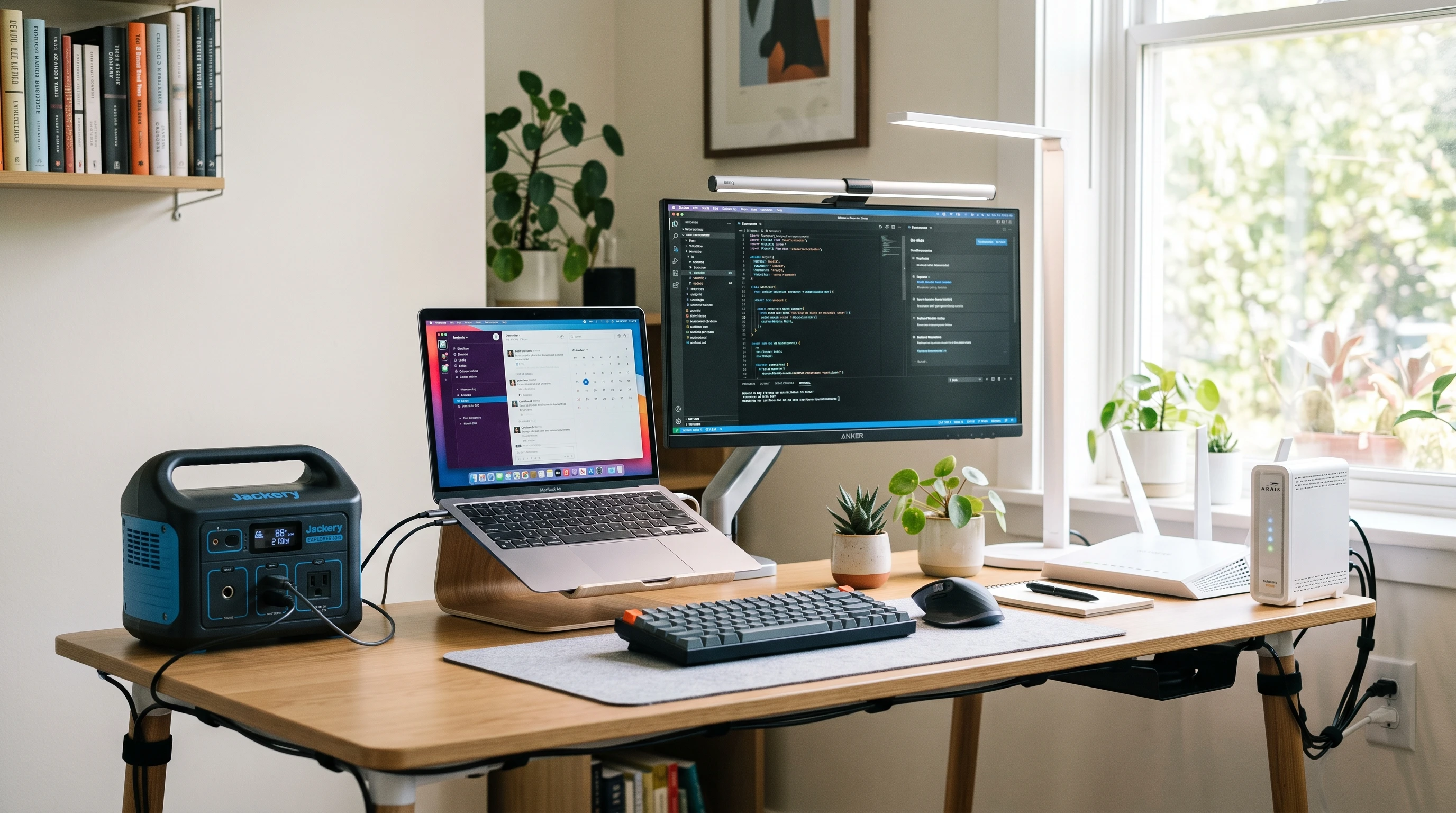
A portable power station can help keep essential home office devices running during a power outage. For remote workers, the main goal is usually not to power every device in the room, but to keep the most important equipment working long enough to finish tasks, stay online, or shut down safely.
The right size depends on what you need to power, how many watts those devices use, and how long you want them to run. A laptop, router, modem, phone charger, and LED lamp may only need a small or medium power station, while a desktop computer, large monitor, or longer outage may require more battery capacity and higher output.
Quick Answer
For a basic home office setup, a portable power station with around 250 to 500 watt-hours (Wh) may be enough to run a laptop, router, modem, phone charger, and small LED lamp for a few hours. If you also need a monitor, desktop computer, or longer runtime, a 500Wh to 1000Wh model may be more realistic.
Always check the wattage of your own devices before choosing a power station. Runtime depends on total power draw, usable battery capacity, inverter efficiency, battery age, temperature, and how many devices are connected at the same time.
If you are still comparing options, start with models that clearly list watt-hours, continuous output, battery chemistry, charging options, and device compatibility rather than choosing by battery size alone.
What Devices Do You Need to Power?
Every home office is different, so it’s helpful to make a quick list of what you’d need during an outage. Common work-from-home essentials include:
- Laptop: Laptops are usually efficient and are easier to back up than desktops.
- Desktop Computer: These draw more power than laptops and need a power station with higher output.
- Monitor: Most monitors use more power as screen size increases.
- WiFi Router and Modem or ONT: Internet equipment stays low in power needs (commonly under 30W combined) but is really important for video calls or remote work.
- Mesh WiFi Node: These can add a small extra load if you use one.
- Phone Charger: Charging phones uses minimal power, but adds to the total when combined with other gear.
- LED Desk Lamp: Most LED lamps sip power, making them a practical choice in outages.
- External Drive: Portable external hard drives might draw 2–10 watts, while some larger drives draw more.
- Small Printer: If you need to print during an outage, check the label and consider its startup wattage.
You probably do not need every device to run through an outage. Backup only your essentials to save battery life so the power station lasts longer.
Why Wattage and Watt-Hours Matter
Choosing a portable power station for working from home means understanding two main specifications: watts and watt-hours.
Watts (W): This shows how much power a device uses at any moment. If your laptop charger says 60W, that’s how much energy it needs when in use.
Watt-hours (Wh): This describes battery capacity. It shows how much energy the power station can store and provide.
A portable power station with 500Wh of capacity theoretically supplies 500 watts for one hour, or 50 watts for ten hours. However, in real life, the actual output will be less due to inverter loss (often 10–20%), battery health, and the types of devices drawing power. Usable battery capacity is sometimes listed separately in product details, which can help you make more accurate comparisons.
Typical Home Office Power Needs
Most home office gear isn’t especially power hungry, but it helps to check your own device labels. Here are some ballpark figures for common equipment:
- WiFi Router and Modem: 10–30W combined, depending on the model.
- Laptop: Usually between 30W and 65W while charging, depending on the model, charger wattage, and use. Older or gaming laptops can use much more.
- Monitor: Small to midsize LED monitors may draw 15–40W. Larger or older monitors may use more.
- Desktop Computer: Usually requires much more, from 100W to 300W for basic to mid-power setups. High-end or gaming desktops can spike even higher.
- LED Desk Lamp: 5–10W for a small desk lamp.
- Phone Charger: Usually 5–18W, but quick charging adapters can draw up to 25W or more.
It’s always smart to check device manuals, look for a sticker or label, or search your model online for accurate watt numbers. Make sure not to guess too low, especially for items like monitors and computers. Consider testing your devices ahead of time to see how much power they draw in real use, which can give you an even more accurate estimate for power needs during outages.
How to Estimate Portable Power Station Runtime
A simple way to figure out how long a power station will last is to calculate your total device wattage and divide the usable battery capacity (watthours) by that number.
For example, say you run a laptop (60W), router/modem (20W), and a desktop lamp (10W). That’s 90W total. With a power station rated for 500Wh, divide 500 by 90, which gets you a rough estimate of 5.5 hours. In real use, expect a bit less due to inverter efficiency and battery age. Usually, you lose about 10–20% of the total capacity.
Several factors affect real runtime, including:
- Actual wattage under different loads (full brightness, high processing, etc.)
- Inverter efficiency (how well the power station converts battery power to usable output)
- Battery age and temperature (older or cold batteries hold less charge)
- Extra devices plugged in unexpectedly
This is why it really helps to test your equipment in advance so you’re not left guessing during an outage. Try once every few months to test your devices with your power station to be sure you’ll get the runtime you expect when you need it.
Small vs Medium vs Large Power Stations
Portable power stations come in many sizes. Here’s a basic way to think about what size portable power station for home office makes sense for you:
- Small Power Station (150–300Wh): Handy for only the most basic setup: router/modem, small laptop, phone charger, and low-power LED lamp. These are lightweight and easy to move but may last only 2–4 hours with all devices running.
- Medium Power Station (300–700Wh): Good for adding a monitor or extending runtime for a basic laptop, modem, router, and lamp setup. Depending on the connected devices, it may cover several hours of work, but a full workday is not guaranteed. This size range is often a practical middle ground for home office backup.
- Large Power Station (800Wh and higher): Useful for longer outages, more devices, or some desktop setups. Runtime still depends heavily on the total wattage of connected equipment, so a full day is possible only with a carefully limited load.
Choosing the best portable power station for your needs is about finding a balance. A huge unit may sound great, but it’s heavier, costs much more, and might be overkill for something as simple as keeping your WiFi equipment and laptop running. It makes the most sense to size the unit to your critical needs and typical outage length. Most home office users find a medium power station provides enough backup for occasional outages while still being affordable and manageable to store.
Before buying, compare the total wattage of your home office devices with the power station’s usable capacity and continuous output rating. A slightly larger model may be more practical if you need to run a monitor, internet equipment, and laptop at the same time.
Portable Power Station vs UPS for Home Office
If you’re deciding between a portable power station and an uninterruptible power supply (UPS), here’s how things usually shake out:
- UPS units instantly switch to battery power when the power drops. This can help protect unsaved work, keep network equipment online briefly, and give you time to shut down devices properly.
- Portable power stations are good for longer outages. They often cost a bit more, but you can connect a bigger mix of devices, and sometimes even recharge them with solar panels. Most portable power stations do not work like a traditional UPS unless the manufacturer specifically lists UPS or EPS functionality. If automatic switchover is important, check the product specifications carefully before buying.
Batteries in portable power stations often have more capacity, but check the specs for continuous output because some may not support the same instant peak loads as a UPS. For a direct comparison, visit Portable Power Station vs UPS. While UPS devices are a staple for desktop users, many remote workers now opt for portable power stations due to the extra flexibility and ability to run multiple types of devices during lengthier outages.
Safety Tips
Using a portable power station in a home office is usually straightforward, but a few basic safety steps are important:
- Read the manufacturer’s guidelines and check the user manual.
- Do not plug in devices that use more wattage than the power station’s continuous output rating.
- Use cables that came with your power station or are listed as compatible.
- Place the power station on a flat, well-ventilated surface. Do not let it get wet or cover it during use or charging.
- Don’t daisy chain power strips or overload multi-outlet adapters.
- Never use or recharge a fuel-powered generator indoors, in garages, near open windows, or in enclosed spaces. Fuel generators must be used outdoors and away from buildings according to manufacturer instructions and local safety guidance.
Following basic safety guidance can reduce the risk of overloads, overheating, damaged equipment, or unsafe charging practices. If the power station is used in a shared space or around children or pets, place it where it cannot be knocked over, covered, unplugged accidentally, or exposed to moisture.
If you rely on medical equipment, do not size a backup system by guesswork. Check the device manufacturer’s guidance and speak with a qualified professional or healthcare provider about safe backup power options.
Common Mistakes to Avoid
- Focusing only on battery size: Output wattage is just as important as total capacity. Make sure your power station can handle the load of all your connected devices running at once.
- Forgetting about your modem or ONT: Forgetting about your modem or ONT: Internet access may stop if the modem, fiber ONT, router, or mesh node loses power. Check which internet devices need backup before an outage.
- Trying to run a desktop and large monitor on a small power station: This can trip the overload protection quickly, causing everything to shut off.
- Ignoring inverter loss: Factor in 10–20% loss for inverter efficiency; the battery won’t give you its full stated watthour amount.
- Expecting fast solar charging in all weather: Solar panels work best in strong, direct sunlight and can be slow or unreliable if it’s cloudy, raining, or late in the day.
- Leaving the power station drained before outage season: Keep the power station charged according to the manufacturer’s storage and maintenance guidance so it is ready when needed.
- Powering non-essential or high-power devices: Recharge only what you really need. Skip large printers, desk fans, or second monitors if you want battery life to last.
Many home office users also forget to check their power station every couple of months. Make a habit of fully charging it, powering your devices for an afternoon, and confirming the actual runtime matches your expectations. This can catch any problems before a surprise outage hits.
Related Guides
- Best Backup Power Options for Working From Home During Outages
- How to Keep WiFi Running During a Power Outage
- Portable Power Station vs UPS
- Portable Power Station Safety Guide
- Best Portable Power Stations for Storm Preparedness
- How to Protect Electronics During a Power Outage
- Best Solar Generators for Home Backup
Frequently Asked Questions
What size portable power station do I need for a home office?
For a basic home office setup, a portable power station with around 250 to 500Wh may be enough for a laptop, router, modem, phone charger, and small LED lamp during a short outage. If you need to run a monitor, desktop computer, or work for longer periods, a 500Wh to 1000Wh model may be more realistic.
Can a portable power station run a laptop and monitor?
Most medium and large portable power stations can run a laptop and LED monitor at the same time, but the exact runtime depends on the combined wattage of both devices. Check the power station’s continuous output rating and compare it with your laptop charger, monitor, router, modem, and any other connected devices.
Can a portable power station run a router and modem?
Yes, most portable power stations can run a router and modem because these devices usually use relatively little power. However, the exact runtime depends on the wattage of the router, modem, fiber ONT, mesh WiFi node, and the usable battery capacity of the power station.
Is a 300Wh power station enough for working from home?
A 300Wh power station may be enough for short outages and minimal devices, such as a laptop, router, modem, phone charger, and small LED lamp. It is usually less suitable if you need to run a monitor, desktop computer, printer, or several devices for a full workday.
Is a 500Wh power station enough for a home office?
A 500Wh power station is a common size for basic home office backup. It may run a laptop, internet equipment, phone charger, and small light for several hours. Adding a monitor, desktop computer, or other devices will reduce runtime, so it is important to calculate the total wattage before relying on it.
Should I use a UPS or portable power station for remote work?
A UPS is usually better if you need instant automatic backup for a desktop computer, router, modem, or network equipment. A portable power station usually offers longer runtime and more flexibility, but many models do not switch over automatically unless they specifically include UPS or EPS functionality.
Can a portable power station work as a UPS?
Some portable power stations include UPS or EPS functionality, but not all models do. If automatic switchover is important for your home office, check the manufacturer’s specifications carefully before buying. A traditional UPS may still be the safer choice for equipment that must not lose power suddenly.
How long can a portable power station run home office equipment?
Runtime depends on the total wattage of your devices, the usable battery capacity, inverter efficiency, battery age, temperature, and how many devices are connected. As a rough estimate, divide the power station’s watt-hour capacity by your combined device wattage, then subtract around 10–20% for real-world losses.
What is more important for a home office, watt-hours or output watts?
Both matter. Watt-hours show how much energy the power station can store, while output watts show how much power it can deliver at one time. For a home office, the power station needs enough battery capacity for runtime and enough continuous output for all connected devices.
Can I run a desktop computer from a portable power station?
Some portable power stations can run a desktop computer, but desktops usually use more power than laptops. You need to check the desktop’s power draw, monitor wattage, and any startup or peak loads. A small power station may overload quickly if the desktop and monitor draw too much power together.
Can I use solar panels to recharge a portable power station during an outage?
Many portable power stations can be recharged with compatible solar panels, but charging speed depends on sunlight, panel size, weather, angle, shading, and the power station’s solar input limit. Solar charging can be useful, but it should not be assumed to provide fast or reliable charging in poor weather.
What should I avoid plugging into a home office power station?
Avoid plugging in high-power or non-essential devices unless the power station is rated for them. Large printers, space heaters, kettles, coffee machines, fans, gaming desktops, and multiple monitors can drain the battery quickly or overload smaller units. Focus on essential work devices first.
Wrapping Up
The right portable power station size for a home office depends on the devices you need to run, their combined wattage, and how long you want backup power during an outage. A small power station may be enough for a laptop, router, modem, phone charger, and LED lamp during a short outage. A medium or larger model may be more practical if you need a monitor, desktop computer, or longer runtime.
Before choosing a model, list your essential devices, check their wattage, compare the total load with the power station’s continuous output rating, and estimate runtime using usable battery capacity rather than the advertised number alone.
A portable power station is most useful when it is sized for essential equipment, kept charged according to the manufacturer’s guidance, and tested before an outage happens. With a realistic setup, it can help keep a home office online and reduce disruption when the power goes out.